
Urgent care revenue cycle management is the process of turning every walk-in visit into collected cash, from the moment a patient checks in until the last balance is paid. It covers eligibility checks, charge capture, coding, claim submission, payment posting, denial work, and patient collections. In urgent care, all of this has to run fast, because you treat unscheduled patients, bill many different payers, and earn a modest amount on each visit.
That model leaves little room for error. A claim denied for a wrong code or inactive coverage can cost more to fix than the visit earned, and walk-in volume means the same mistake repeats every day. Strong revenue cycle management catches problems at the front desk instead of 60 days later in accounts receivable.
This guide explains why the discipline matters so much in urgent care, how each stage works, how to cut denials, how to collect faster, and when it makes sense to outsource. InfiniteRCM provides billing services to urgent care centers and other practices, and the advice below reflects how that work runs day to day.
Why urgent care revenue cycle management matters
It matters because urgent care combines high volume, unpredictable coverage, and a low average revenue per visit. Small leaks in that setup add up quickly, and nothing else in the clinic recovers the money once a claim ages out.
Walk-ins make front-end errors expensive
A scheduled practice can verify insurance days before a visit. An urgent care center cannot. The patient arrives with an old card, a plan that changed in January, or no card at all, and you have a few minutes to get it right. Registration and eligibility mistakes are among the most common causes of rejected and denied claims, so the front desk carries more financial weight here than in almost any other setting.

The practical consequence is that your revenue cycle starts before the clinical encounter. If check-in captures the wrong subscriber ID, every later stage works on bad data.
What makes urgent care billing different
The table below shows the traits that shape your billing workload.
| Urgent care trait | What it does to billing |
|---|---|
| Walk-in visits | No time for eligibility checks before the patient arrives |
| Mixed payers: commercial, Medicare, Medicaid, self-pay, employer accounts | Each has its own rules, forms, and filing limits |
| Many services in one visit (exam, X-ray, lab, injection, splint) | More charges to capture and code correctly |
| Extended and weekend hours | Registration and collections happen with less supervision |
| Seasonal volume swings | Billing backlogs build during flu season |
Profitability follows from this. How profitable a center is depends on visit volume, payer mix, and how much of what you bill you actually collect. Revenue cycle management is the only one of those three levers you control entirely inside your own walls.
The hidden cost to staff and patients
Poor revenue cycle work also costs you in ways that never show on a claim. Staff spend hours reworking denials that clean registration would have prevented, which feeds burnout in a role that already sees high turnover. Patients get surprise statements weeks after a visit, and they remember that experience when choosing where to go next time.
In urgent care, most revenue is won or lost at check-in, not at the billing desk.
How the urgent care revenue cycle works, stage by stage
The cycle has eight stages, and the work moves from the front desk to the billing team and back to the patient. Each stage hands clean or dirty data to the next, which is why a mistake early on shows up as a denial later.
| Stage | What happens | Urgent care watch-out |
|---|---|---|
| 1. Preregistration | Online check-in, insurance card and ID capture | Patients often skip it, so the front desk must catch up |
| 2. Registration and eligibility | Confirm demographics, coverage, and benefits | Verify before the patient is roomed |
| 3. Charge capture | Turn every service and supply into a billable charge | X-rays, labs, and injections get missed |
| 4. Coding | Assign CPT, ICD-10, and HCPCS codes and modifiers | Level of service and modifiers drive payment |
| 5. Claim submission | Send clean claims to payers electronically | Speed matters, but never at the cost of accuracy |
| 6. Payment posting | Post payments and adjustments, flag underpayments | Compare payments to contract rates |
| 7. Denial management and follow-up | Work denials, appeal, chase unpaid claims | Follow up on a fixed schedule per payer |
| 8. Patient billing and collections | Bill balances and collect | Collect at the visit whenever possible |
The front end: preregistration, eligibility, and payment at check-in
Stages one and two decide whether a claim can be paid. Offer online preregistration so patients enter their own details, then verify coverage with a real-time eligibility check before the patient reaches the exam room. Train staff on what to do when the check shows no coverage: ask for a card, offer a self-pay rate, or set up a payment plan. Collect the copay at this point too, since a balance is hardest to collect once the patient has left.
The middle: charge capture and coding
Charge capture means every service in the visit appears on the claim. Urgent care visits often include an exam plus a rapid strep test (87880), a chest X-ray (71046), an injection (96372), or a simple wound repair (12001). Missing any of these is invisible revenue loss, because no denial ever tells you about a charge you never billed.
Coding turns the visit into codes. New patient office visits use 99202 to 99205 and established patient visits use 99211 to 99215. Since 2021, office visit levels are chosen by medical decision making or total time, so the note must show the thinking behind the visit. When you bill a procedure and a separately identifiable exam on the same day, the exam usually needs modifier 25. Claims for urgent care also use place of service code 20, and a few payers want additional urgent care codes, so check each contract.
The back end: submission, posting, follow-up, and patient balances
Submit claims within days of the visit. InfiniteRCM, for example, submits most claims within 24 to 48 hours after charge entry through secure clearinghouses. Payment posting comes next. Compare every payment to the contracted rate, because underpayments look like normal payments unless someone checks. Then work what remains: denied claims, unpaid claims, and patient balances. Watch timely filing limits, which vary by payer. Medicare allows 12 months from the date of service, while many commercial contracts allow far less, sometimes 90 days.
A claim is only as clean as the registration and coding that came before it.
How to reduce denials in urgent care revenue cycle management
You reduce denials by fixing causes where they start, then working every denial that still occurs by root cause. Appealing individual claims one at a time treats symptoms while the same error keeps feeding the queue.
Prevent the common causes
Four causes account for most avoidable denials in a walk-in setting:
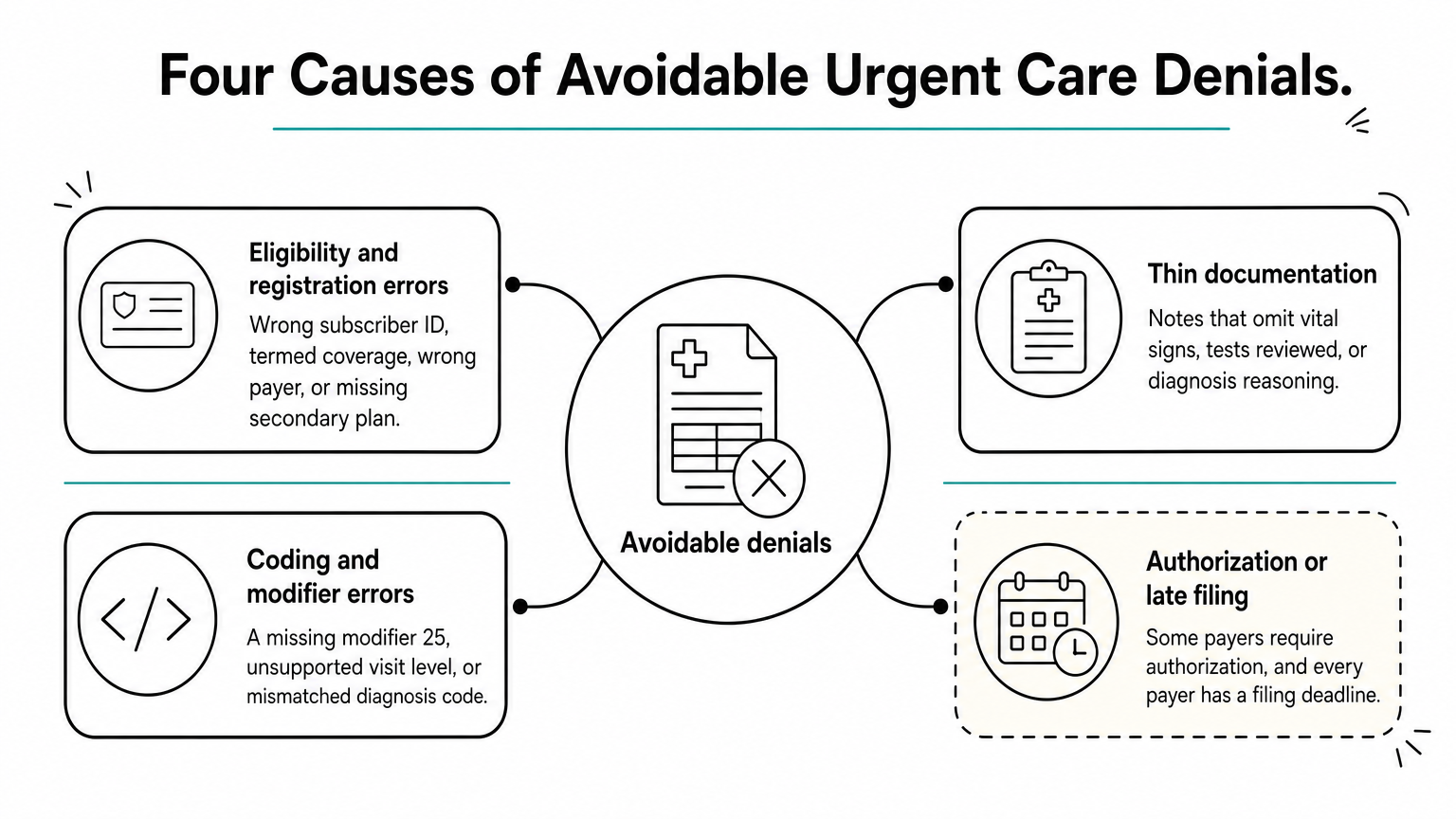
- Eligibility and registration errors: wrong subscriber ID, termed coverage, wrong payer, or a missing secondary plan.
- Coding and modifier errors: a missing modifier 25, a visit level that the note does not support, or a code that does not match the diagnosis.
- Thin documentation: a note that omits vital signs, tests reviewed, or the reasoning behind the diagnosis.
- Missing authorization or late filing: some payers require authorization for specific services, and every payer has a filing deadline.
Run a scrubber or manual review before submission so that coding and registration errors never leave the building. Ongoing coder and provider training matters too, because code sets and payer policies change every year.
Work denials by reason and payer
Log every denial by reason code and payer, then review the log monthly. If one payer keeps denying a particular code, you have a contract or coding problem to fix once, not 40 claims to appeal. Here is a hypothetical to show the stakes. A clinic bills 1,500 claims a month with an average payment of $120. At an 8% denial rate, that is 120 denials, or $14,400 in payments at risk. If a third of them are never reworked, 40 claims and $4,800 vanish each month, which is $57,600 a year.
Set a standing appeal routine too. Appeal deadlines are short and written in the denial notice, so assign each denial an owner and a due date the day it arrives.
Check credentialing before it costs you claims
Urgent care centers add providers often, and a provider who is not yet enrolled with a payer produces denials no coding fix can solve. Confirm that every clinician is credentialed and linked to each payer contract before they see that payer’s patients. Keep CAQH profiles attested on schedule, and answer recredentialing notices before the deadline. InfiniteRCM offers credentialing and enrollment support for this reason, since the paperwork lags behind hiring at most growing centers.
Fix the cause of a denial once and you stop paying for it on every claim after.
How to speed up collections and improve cash flow
Collections speed up when you collect at the visit, submit claims within days, follow up on a fixed schedule, and measure accounts receivable every month. Each of those habits shortens the time between treating a patient and being paid.
Collect at the visit
Money collected at check-in costs almost nothing to collect. Money billed afterward costs statements, calls, and write-offs. Make point-of-service collection a standard step, and give staff a script so asking feels routine:

You have a $25 copay today. Would you like to use the card on file,
or a different card?
Ask patients for permission to keep a card on file, which lets you collect small balances later without another awkward conversation. Show patients their estimated responsibility before treatment when you can. The staff member most comfortable talking about money should cover the busiest hours.
Track the metrics that show where cash is stuck
You cannot fix what you do not measure. Review these every month, split by payer where possible.
| Metric | How to calculate | What a rising number tells you |
|---|---|---|
| Clean claim rate | Claims accepted on first submission, divided by claims submitted | Registration or coding errors are growing |
| Denial rate | Denied claims divided by claims submitted | A payer, code, or workflow problem |
| Days to bill | Visit date to claim submission | Charge entry or coding backlog |
| Days in A/R | Total A/R divided by average daily charges | Cash is slow, so follow-up is weak |
| A/R over 120 days | A/R older than 120 days divided by total A/R | Old claims are going uncollected |
| Front desk collection rate | Collected at visit divided by patient responsibility | Staff are not asking for payment |
A worked example for days in A/R: a clinic with 60 visits a day and $220 in average charges per visit bills $13,200 daily. With $396,000 in A/R, that is 30 days. If A/R grows to $528,000, days in A/R rise to 40, which means an extra $132,000 of cash sits waiting on payers.
Follow up on a schedule
Many billing teams contact each payer about unpaid claims every 30 to 45 days. Give each payer its own day of the month so the work stays level instead of piling up on one date. For claims already aged past that window, a dedicated A/R recovery effort finds unpaid claims, underpayments, and denials that were never appealed. InfiniteRCM’s AR Recovery service handles that work: unpaid claim follow-up, underpayment identification, denied claim resolution, and appeal management.
The fastest way to improve cash flow is to stop letting claims age without an owner.
In-house, outsourced, or hybrid: choosing a model
Choose in-house billing when you have a stable, trained biller and clear reporting. Choose outsourcing or a hybrid when denials climb, A/R ages, or turnover keeps resetting your training. The right answer depends on volume and staff stability, not on clinic size alone.
What a revenue cycle manager does
Someone has to own the whole cycle, whether that person is your practice manager, a dedicated revenue cycle manager, or an outside team lead. The job is to set standard operating procedures, train staff, review the monthly metrics, track denial trends by payer, and keep credentialing current. Without one owner, front desk, coders, and billers each optimize their own task and nobody sees the leaks between them.
Questions to ask before you outsource
If you outsource, judge a partner on how they work with your existing systems and how clearly they report. Ask these questions:
- Does the team work inside your current EHR and practice management system, or do you have to switch?
- How often do you get reports, and do they include denial reasons by payer?
- How fast are claims submitted after charge entry?
- Is pricing percentage-based, flat, or customized, and are all fees disclosed?
- What are the contract terms and the notice period?
- How are patient data and HIPAA obligations handled?
- Are the coders certified, and do they use ICD-10, CPT, and HCPCS?
For reference, InfiniteRCM works in clients’ existing systems, provides weekly performance reports, discloses fees up front, and requires no long-term contracts. It also guarantees a clean claim rate of 99% or more. Whatever partner you pick, get these answers in writing.
Whoever runs your billing, someone must own the whole cycle and report on it monthly.
Where to start
Urgent care revenue cycle management comes down to a few repeatable habits: verify coverage before the visit, capture and code every service, submit clean claims fast, work denials by root cause, and collect from patients at check-in. Measure it monthly so you can see which stage is leaking.
Start with your own numbers. Pull your denial rate, days in A/R, and the share of A/R over 120 days, then trace the worst one back to the stage that causes it. If you want a second set of eyes on that review, contact InfiniteRCM for a free consultation and talk through your billing volume and where your claims get stuck.