
You see the patient, document the visit, and send the claim. Then the money takes weeks to arrive, or never does. If that sounds familiar, you are probably asking what is revenue cycle management and whether a better process could fix it.
Revenue cycle management (RCM) is the process that tracks a patient’s account from the first appointment to the final payment. It covers scheduling, insurance verification, coding, claim submission, payment posting, and denial follow-up. Every step affects whether you get paid, how much, and how fast. A mistake at the front desk often shows up as a denied claim 30 days later.
This article explains the definition in plain terms, then walks through each step of the cycle in order. You will see where practices lose money most often and why it matters for your cash flow. At InfiniteRCM, we manage this process for 500+ providers, so the examples come from real billing work, not theory.
Why revenue cycle management matters for providers
Providers rarely lose revenue in one big event. They lose it in small, repeated ways: a typo in a policy number, a missed authorization, a denial nobody works. Revenue cycle management for healthcare matters because it closes those gaps before they become write-offs. When the process works, you collect what you earned. When it does not, you do the clinical work and absorb the cost.
It keeps cash flow predictable
Payroll, rent, and supply invoices come due on a fixed schedule. Insurance payments do not. A practice with high accounts receivable (AR) days is lending money to payers, interest free, while it covers its own bills. Tighter front-end checks and scheduled follow-up shorten that gap. Our clients see collections arrive about 40% faster once claims go out clean and aging accounts get worked on a routine.
Cash flow also depends on your clean claim rate. A clean claim passes payer edits on the first submission, so it gets paid without rework. Every correction adds days or weeks. We maintain a 99% clean claim rate at InfiniteRCM, which means very little sits in a queue waiting for someone to find the missing modifier.
Where revenue leaks without a process
Leaks cluster at predictable points in the cycle. The table below shows the most common ones and what each looks like in a real practice.
| Stage | Typical leak | Result |
|---|---|---|
| Registration | Wrong insurance ID or date of birth | Rejected claim |
| Eligibility verification | Inactive coverage, missed authorization | Denial or uncollectable patient balance |
| Coding | Missing modifier, undercoded visit | Denial or underpayment |
| Claim submission | Filing after the payer deadline | Permanent write-off |
| Denial follow-up | Nobody owns the appeal | Lost revenue |
Notice that most of these start before the claim even exists. Front-end errors are the cheapest to prevent and the most expensive to fix later. That is why eligibility checks and prior authorization belong inside the revenue cycle, not just in the billing office.
Most denials are born at the front desk and discovered in the billing office.
What it means beyond the money
Staff feel the difference first. When your team chases rejections by hand, burnout follows, and replacing an experienced biller is slow and costly. A defined workflow gives each person clear ownership of a step. Many practices bring in a revenue cycle management service at this point, so their own team can focus on patients instead of payer portals.
Compliance is the other piece. Coding rules and payer policies change often, and audits look backward at what you submitted. A documented process with clear audit trails reduces your risk when a payer asks questions. We hold a 100% compliance rate for that reason.
Patients benefit as well. Accurate eligibility checks mean clearer cost estimates at the visit and fewer surprise bills afterward. That improves collections from patients and protects the relationship you built in the exam room.
How the revenue cycle works, step by step
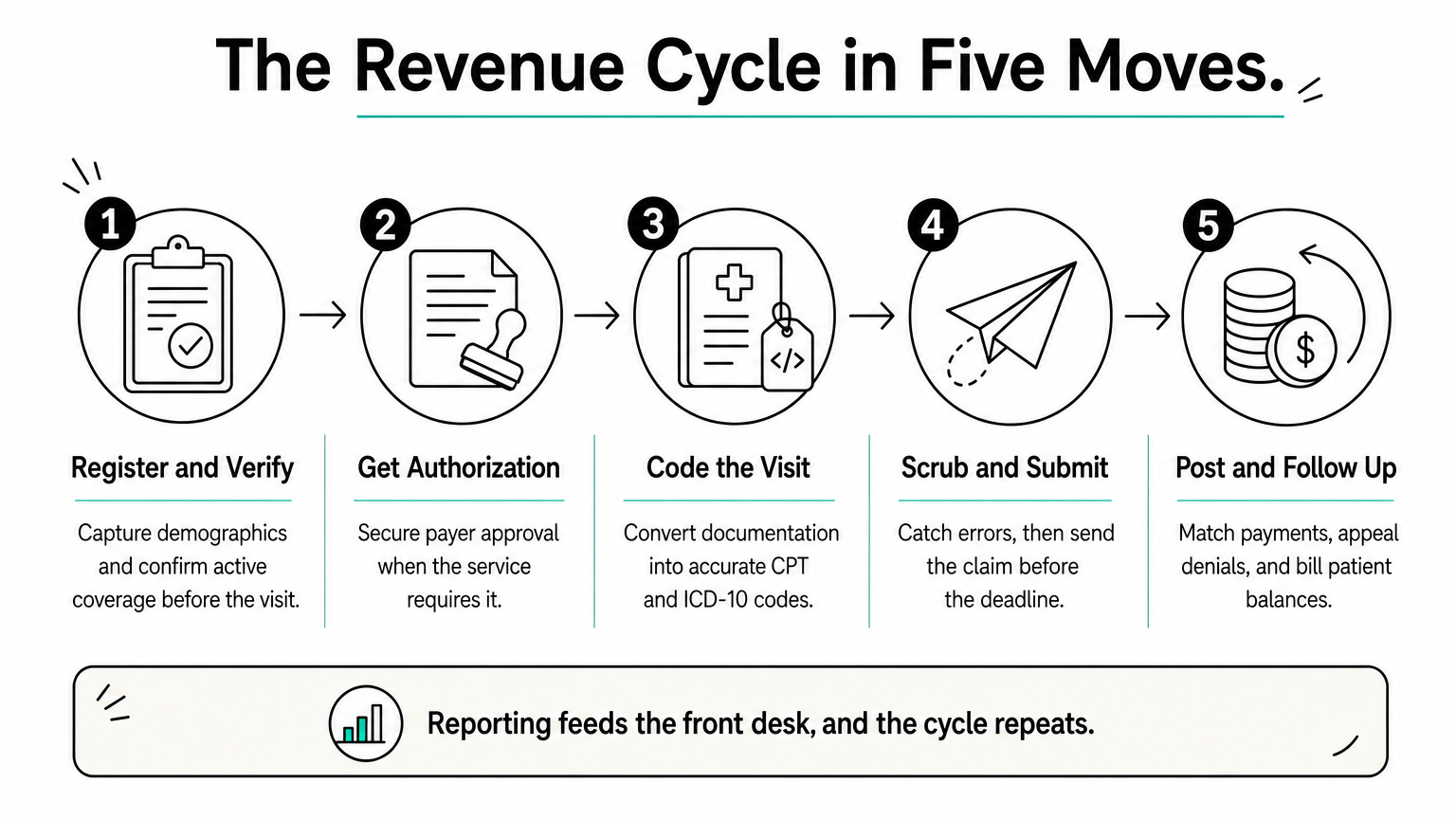
Revenue cycle management in medical billing follows a patient account through eight steps, grouped into three phases. Each step hands data to the next, so one bad entry travels all the way to the payer. Here is the sequence in the order your team handles it.
Front end: before the visit
The cycle starts at the schedule, not the billing office. Your staff captures demographics and insurance details, then confirms that coverage is active and whether the service needs approval. This phase is the cheapest place to prevent a denial, because fixing a typo takes seconds while appealing a denial takes weeks.
- Scheduling and pre-registration: collect demographics, insurance card images, and referral details.
- Eligibility verification: confirm active coverage, copay, deductible, and in-network status.
- Prior authorization: submit clinical documents and track approval before the visit when the payer requires it.
Every step hands data to the next, so one bad entry travels all the way to the payer.
Mid-cycle: during and after the visit
Now the clinical work gets translated into billing language. The provider documents the encounter, and a coder converts it into CPT and ICD-10 codes that describe what was done and why. Thin documentation leads to undercoding or denials, so a good coder queries the provider before the claim leaves, not after the payer rejects it.
- Charge capture and coding: record every billable service and assign accurate codes and modifiers.
- Claim scrubbing and submission: run edits to catch errors, then send the claim electronically within the payer’s filing deadline.
Back end: after the claim goes out
Once the payer responds, the work shifts to payment posting and denial management. Posting means matching each remittance to its claim and spotting underpayments against your contracted rates. Denials need an owner and a clock, because appeal deadlines vary by payer and some are short. Whatever the payer does not cover becomes a patient balance, which needs a clear statement and a simple way to pay.
- Payment posting: apply payer and patient payments, and flag short pays.
- Denial management and AR follow-up: correct, appeal, or resubmit, and work aging claims by priority.
- Patient billing and reporting: send statements, collect balances, and review results such as denial rate and AR days.
The last step feeds the first. Reporting shows which payers and codes keep failing, and that tells your front desk what to check next time.
How revenue cycle management connects to medical billing
People often use the two terms as if they mean the same thing. They do not. Medical billing is one part of revenue cycle management, and the difference decides whether your problems get fixed or just get moved around.
Billing is one slice of the cycle
Medical billing begins once a visit is documented and coded. It ends when the balance is paid. The revenue cycle starts earlier, at the schedule, and ends later, at performance reporting and process fixes. The table shows the split.
| Medical billing | Revenue cycle management | |
|---|---|---|
| Starts | Coded encounter | Appointment scheduling |
| Ends | Payment posted, statement sent | Reporting and process fixes |
| Covers | Claims, posting, statements | Billing plus eligibility, authorization, coding, denials, analytics |
| Question it answers | Did the claim go out? | Why do claims fail, and how do we stop it? |
Why the distinction affects your money
Picture a practice that outsources only its billing. The biller submits tidy claims, yet the denial rate stays high. The cause sits upstream: nobody verified eligibility or secured an authorization. Billing staff can only work with what they receive, so they end up resubmitting the same preventable errors. That treats the symptom, not the source.
Billing sends the claim; revenue cycle management makes sure the claim deserves to be paid.
Revenue cycle management for medical billing works best when one team owns the whole chain. Registration data reaches the coder intact. Denial trends flow back to the front desk. Nobody gets to say a problem belongs to someone else’s step. We run client accounts this way at InfiniteRCM.
Before you hire a biller or a vendor, ask which of the eight steps they actually own. If the answer starts at claim submission, you are buying billing, not a complete revenue cycle solution. That may be enough for a stable practice with strong front-end habits. It rarely is for one fighting denials.
How to measure and improve RCM performance
You cannot fix what you do not measure. A handful of numbers show where money stalls in your revenue cycle, and a monthly review of them tells you more than any gut feeling about how billing is going.
The five numbers to track
Pull each metric by payer, not just in total, because one payer often causes most of the trouble. The targets below are common benchmarks across the healthcare revenue cycle management industry. Your specialty and payer mix will move them, so use them as a starting reference, then compare against your own trend line.
| Metric | What it tells you | Common target |
|---|---|---|
| Clean claim rate | Claims paid on first submission | 95% or higher |
| Denial rate | Share of claims denied | Under 5% |
| Days in AR | Average time to collect | 30 to 40 days |
| Net collection rate | Collected vs. collectible after contract adjustments | 95% or higher |
| Days to submit | Visit date to claim sent | Under 3 days |
Do not rely on one number alone. A low denial rate can hide a slow submission lag, and a healthy clean claim rate can sit next to underpayments nobody caught.
Turn the numbers into fixes
Read each metric as a pointer to a step in the cycle. A high denial rate usually points to registration, eligibility, or coding. High AR days with few denials point to weak follow-up. A low net collection rate suggests underpaid claims that posting staff never flagged against your contracted rates.
A metric tells you where to look, and the step behind it tells you what to change.
Then run a simple loop and repeat it every month:
- Rank denial reasons by dollars lost, not by count.
- Fix the top three at the source, such as adding an authorization check at scheduling.
- Retrain or adjust the workflow for the person who owns that step.
- Re-measure after 30 days and confirm the rate actually moved.
Small changes add up. Clients who work this loop with us see 60% fewer denials, mostly from front-end fixes that cost almost nothing to put in place.
Build a reporting habit
Set one review date each month and keep the same report layout every time. Consistency lets you spot drift early. Real-time dashboards help here, since you can see a payer’s denial rate climb in week two instead of discovering it at quarter end.
Finally, assign every metric an owner. When the denial rate belongs to a named person, someone acts on it before the next review. When it belongs to nobody, the number just gets reported.
Common RCM challenges and how to avoid them
Most problems in revenue cycle management repeat from one practice to the next. Once you know the usual suspects, you can build simple safeguards before they cost you money. These are the ones we see most often, each with a fix you can start this month.

Denials nobody owns
Denied claims pile up when no one has the job of working them. Appeal windows are often 60 to 180 days, so an untouched denial becomes a write-off by default. Assign every denial to a named person, and set a rule that each one gets reviewed within five business days.
A denial nobody owns is revenue you have already written off.
Underpayments are the quieter version of the same problem. The payer pays less than your contract allows, and nobody notices because the claim shows as paid. Load your contracted rates into your billing system and flag any payment that falls below them during posting.
Coding and documentation gaps
Providers document for patient care, while coders need specific detail to get paid. When those needs clash, you get undercoded visits and medical necessity denials. A short monthly review of real denied charts, with the provider and coder in the same room, closes the gap faster than any memo. Three habits help most:
- Query the provider before the claim goes out, not after the denial arrives.
- Track the top five denial codes for each provider.
- Update note templates whenever a payer changes its documentation rules.
Payer rule changes and staff turnover
Payer policies shift constantly. A service that paid last quarter may need a new modifier or an authorization today. Make one person responsible for reading payer bulletins every month, then update your claim edits to match. A scrubber only catches what you teach it.
Turnover hurts just as much. When your one experienced biller leaves, the knowledge of which payer wants what leaves too. Write payer-specific rules into a shared playbook so a new hire can follow them from day one. If hiring and retraining keep slowing you down, a revenue cycle management service can supply a team that already holds that knowledge and covers absences without a gap in follow-up.
How to choose between in-house RCM and outsourcing
Neither model wins by default. The right choice depends on your claim volume, staff depth, and tolerance for risk. Revenue cycle management can run well either way, so judge each option by results you can measure, not by who sits at the desk.
How the two models compare
| Factor | In-house | Outsourced |
|---|---|---|
| Control | Direct daily oversight | Shared through reports and review calls |
| Cost structure | Salaries, benefits, software, training | Percentage of collections or flat fee |
| Expertise | Limited to the people you hire | Team with payer and specialty depth |
| Coverage | Gaps during turnover and leave | Backup built in |
| Scaling | Hire as you grow | Capacity moves with volume |
Look past the sticker price. A biller’s salary is only part of the bill, because benefits, clearinghouse fees, software licenses, and training add up. Fully loaded in-house costs often surprise owners. An outsourced model swaps them for a predictable fee, so confirm in writing that pricing has no hidden charges.
Signs outsourcing fits your practice
- Your denial rate stays above 5%, or AR days run past 40.
- One employee holds all your billing knowledge.
- Providers or managers spend hours on payer portals.
- You are adding providers, locations, or specialties.
If two or more of these apply, outsourcing is worth pricing out. Keep billing in-house when you have a stable, experienced team, healthy metrics, and a manager who reviews reports every month. In that case, the structure is not your problem.
What to ask a vendor before you sign
Some vendors only handle claim submission, which is billing, not the full cycle. Press for specifics before you commit:
- Which of the eight steps do you own?
- Who works my aging claims, and how often?
- Does your system integrate with my EHR and practice management software?
- What do you report, and how frequently?
- Who owns my data if we part ways?
Whichever route you choose, keep one internal owner for the relationship. That person reviews the monthly metrics and questions anything that drifts.
Outsource the work, never the accountability.
A good partner welcomes that oversight. Clear reporting and a named contact are signs of a trustworthy vendor, and vague answers to the questions above are your cue to keep looking.
Revenue cycle roles, skills, and software
Healthcare revenue cycle management runs on people and software working together. Tools without trained staff just automate mistakes, and skilled staff without tools drown in manual work. When you know who owns each step and which system supports it, gaps become easy to spot.

Core roles on the team
Even a small practice needs every function covered. In a two-provider clinic, one or two people may share them. In a larger group, each function gets a dedicated owner.
| Role | Owns | Steps |
|---|---|---|
| Patient access specialist | Registration, eligibility, copay collection | 1, 2 |
| Prior authorization specialist | Payer requirements, documents, follow-up | 3 |
| Medical coder | CPT, ICD-10, modifiers, provider queries | 4 |
| Billing specialist | Scrubbing, submission, posting, statements | 5, 6, 8 |
| AR and denial specialist | Appeals, aging claims, underpayments | 7 |
| RCM manager | Metrics, payer rules, vendor oversight | 8 |
Skills worth hiring for
Technical training matters, but habits matter more. A coder with a CPC or CCS credential still needs the discipline to query providers instead of guessing. A biller who knows the software still needs payer-specific knowledge to know why one insurer rejects what another accepts. Look for these five skills:
- Coding accuracy, backed by certification
- Working knowledge of your top payers’ rules
- Follow-up discipline on aging claims
- Comfort reading denial and AR reports
- HIPAA awareness in every handoff
Software that supports the cycle
Most practices need five kinds of tools. Not every one has to be a separate product, since some EHR and practice management suites bundle several.
- EHR: clinical documentation and charge capture
- Practice management system: scheduling, registration, claim creation
- Clearinghouse: claim scrubbing, transmission, electronic remittances
- Eligibility and authorization tools: real-time coverage checks and status tracking
- Analytics dashboards: denial rate, AR days, and payer trends
Integration matters more than feature lists. If your EHR and practice management system do not share data, staff retype it, and every retyped field is a new chance for a typo that ends in a denial. Before buying anything, ask how it connects to what you already run.
Software speeds up a good process and exposes a bad one.
That is why we work inside your existing EHR and practice management system at InfiniteRCM instead of asking you to replace them. A cloud-based dashboard then gives you the same reporting view, whether your team or ours handles the work.
Putting the revenue cycle to work
Revenue cycle management is one connected chain, from the first scheduling call to the final payment and the report that follows. Billing is only a slice of it. Most lost revenue starts at the front desk, so prevention beats appeals every time.
Start small. Pick your five metrics, give each one an owner, and fix your top three denial reasons this month. Then decide honestly whether your team can own all eight steps or needs a partner who can. Re-measure after 30 days and let the numbers guide your next change.
If your denials or AR days are not where they should be, talk to a specialist before the write-offs grow. See how InfiniteRCM manages your full revenue cycle, and find out what faster collections look like for your practice.